
COLLECTOR’S FIELD GUIDE
Lists & places
Quick answers for your next collection.
How do I add a place that is missing from the catalog?
Open Create a POI in the list builder. Choose a region, enter the place name and valid latitude and longitude, then complete any required fields for its types. Add an address or notes if useful. You can keep the POI private or submit it for public use; search visibility is a separate choice. Public submissions follow moderation.
How do I update a list and its places?
Open a list you own and choose Edit. Update its title or description, add or remove places, arrange their order and save. Removing a place from the list does not delete the POI itself. Changes create a new revision. If an updated public list is awaiting review, its previously approved revision can remain public; check My submissions for the result.
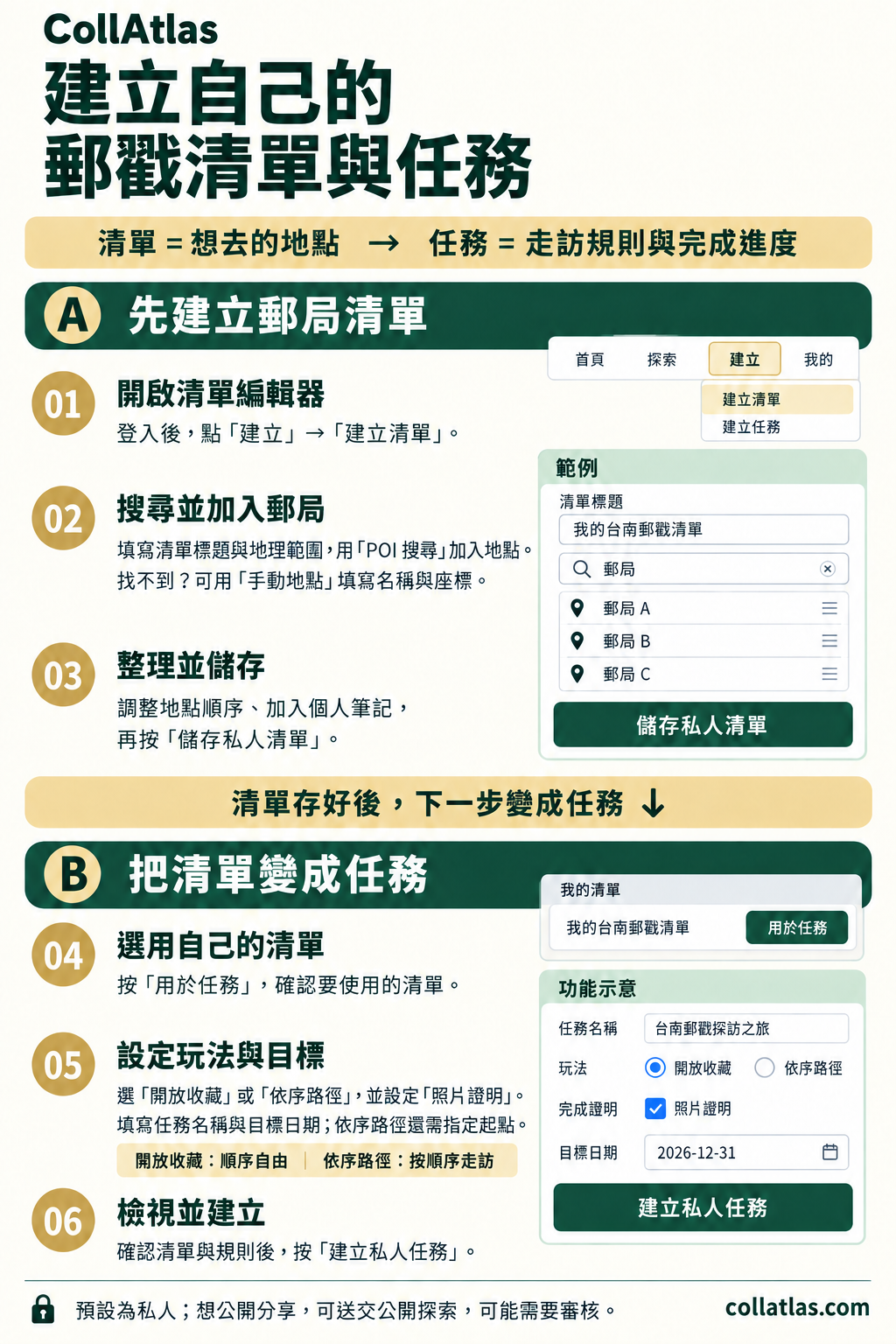
Create your own list and quest
Sign in and create a list. Search for post offices or add places manually, arrange them, and save. Use the list for a quest, choose a collection mode and proof requirements, set a name and target date, then review and create it.
Image language: Traditional Chinese
 Open full-size image (opens in a new tab)