OPENING THE FIELD MAP
OPENING THE FIELD MAP
CollAtlas · Getting started
Try places and quests that are already here. Choose a small route, check what each stop needs, and begin with one visit.
Browse and preview first. Sign in when you want to join, save, or create.
Browse by a place or region you want to visit. Open a quest, check its stops and proof rules, and choose one that fits your first outing. You do not need to create a list first.
Start with a few nearby stops, not a whole country.
Browse questsSelect a quest, start and finish. Try up to three stops for your first route, then check the walking estimate. Sign in when you are ready to save or start; quests may have their own enrollment rules.
A planned route is not turn-by-turn navigation or a verified check-in.
Plan a first outingAt the stop, follow its photo, location, code, or collectible requirements. Review what you submit, then check your progress and continue when ready. Your collectible evidence can be Public or Private; ordinary stop proof follows the quest rules, and catalog image rights are separate.
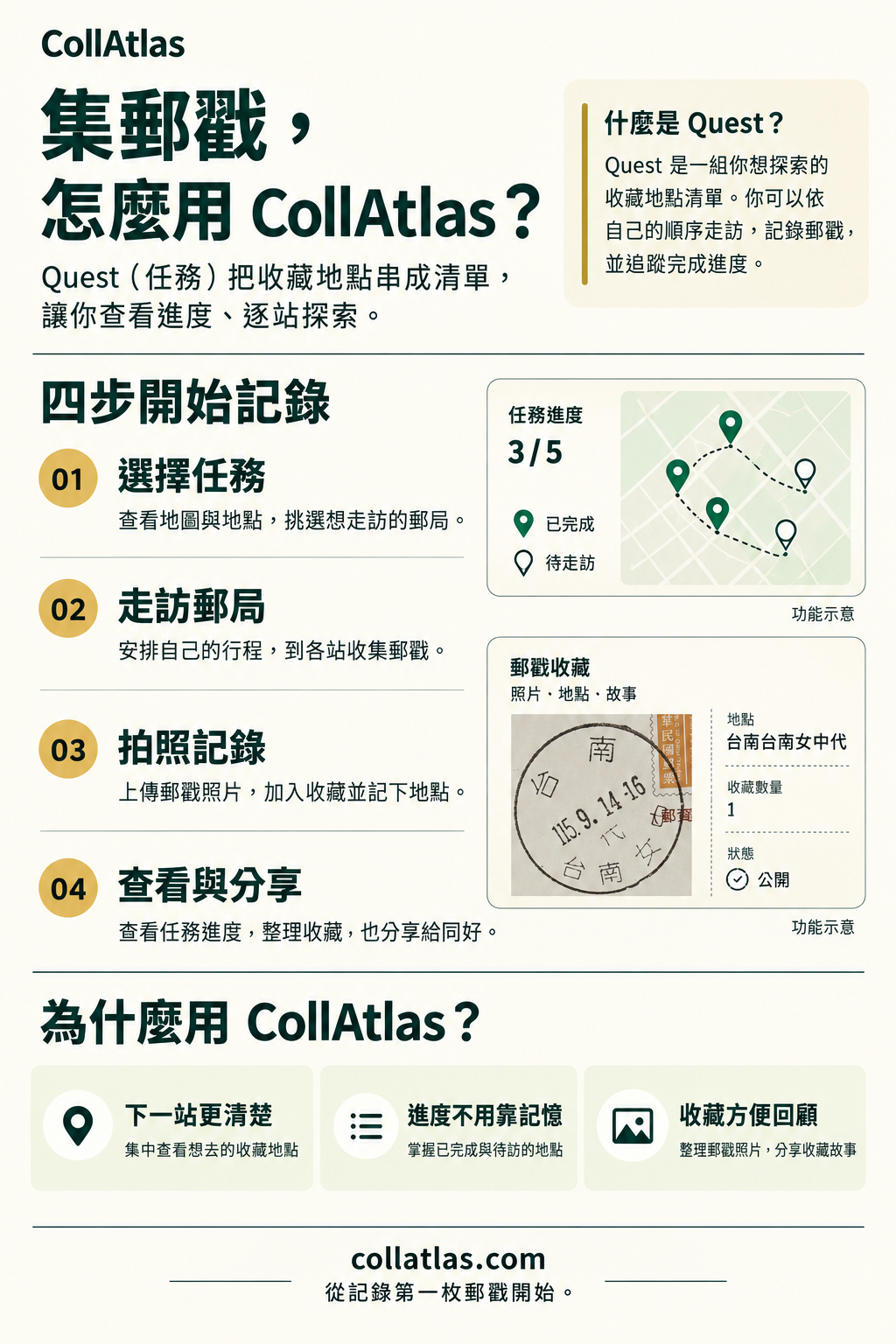
Learn how to record postmarks and build your own collection route. These illustrated guides are in Traditional Chinese; each has a text summary below.
Choose a quest, visit its post offices, upload postmark photos, and review your progress. Keep locations and collection memories together, then share when you want to.
Image language: Traditional Chinese
 Open full-size image (opens in a new tab)
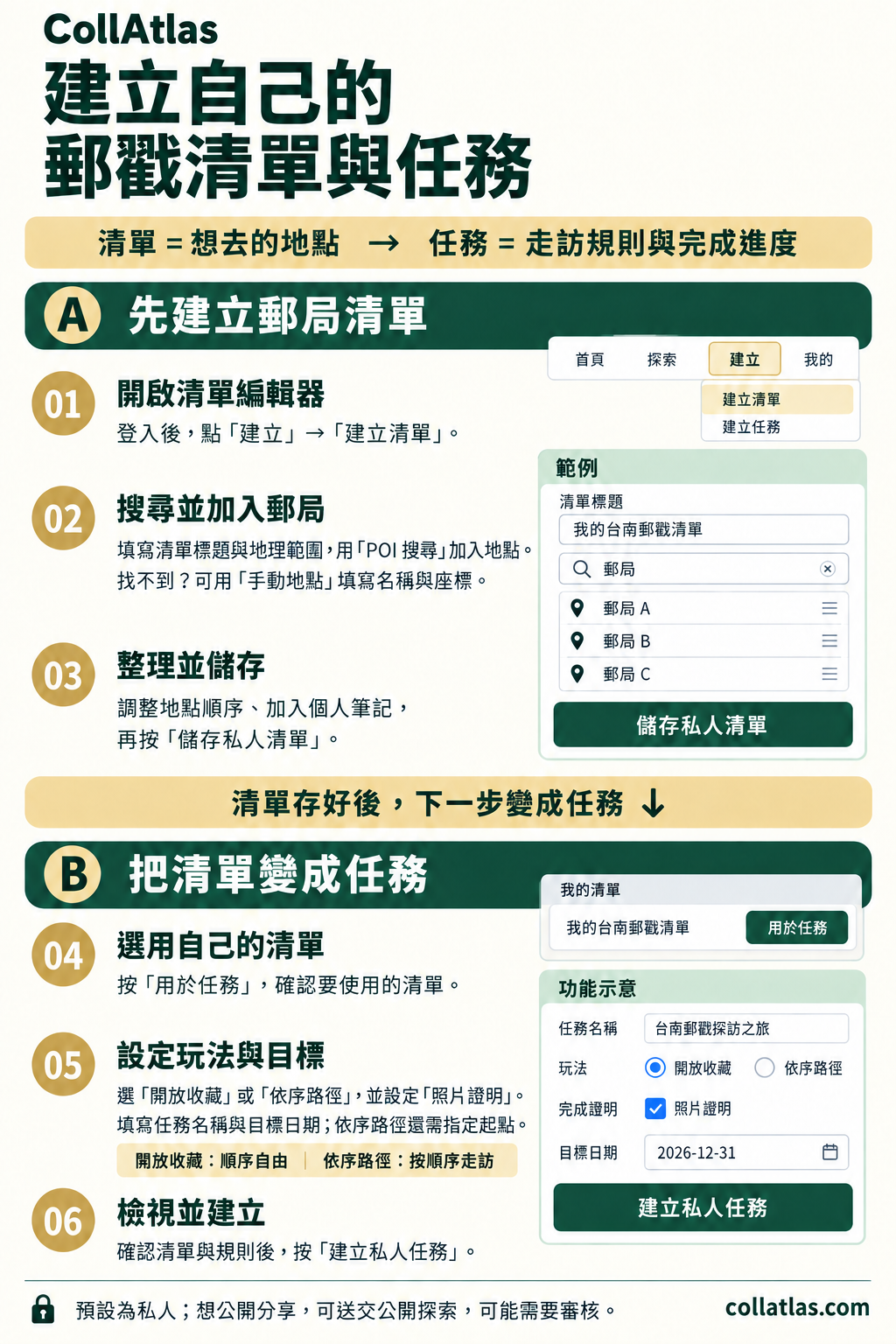
Sign in and create a list. Search for post offices or add places manually, arrange them, and save. Use the list for a quest, choose a collection mode and proof requirements, set a name and target date, then review and create it.
Image language: Traditional Chinese
 Open full-size image (opens in a new tab)
Use a list to gather places, then give them a goal with a quest. These authoring tools remain available whenever you are ready.
Give your list a name and region. At a place you have visited yourself, allow location access, capture your location, and add its name. Confirm the place details, add it to your list, then save.
One place is enough to begin. Try a favorite café or a neighborhood landmark.
Create my first listAfter saving, choose “Use in a quest” to carry your list into the quest builder. Choose a collection for any order, or a path with a starting place. Set the proof method, title and target date, then review and create.
For a simple first quest, try a collection with photo proof.
Create a questOpen your new quest, visit a stop, and follow its proof instructions. Check your progress on the quest page. You can keep your creation private or submit it for public review when you are ready.
Sign in or create an account before saving. We’ll bring you back to the builder.
FAQ
Yes. Browse existing places, lists, and quests. Preview an outing, then sign in to join or save. Create your own content later if you want to.
Browsing and planning do not require GPS. An on-site check-in or creating a new place needs a current location that meets its rules. If permission is blocked, keep your plan, check browser and device settings, and retry on site; choosing coordinates manually does not satisfy on-site verification.
No. You can save privately. Public sharing is a separate submission and review step. Check Submissions for review status. New place records have their own visibility notice in the list builder.